
orybite

Turning startup ideas into polished digital products with speed and precision.
Engineering futuristic digital ecosystems and IT strategic plans to accelerate modern enterprise growth globally.
© 2026 Orybite. All rights reserved.
Built with speed & precision.
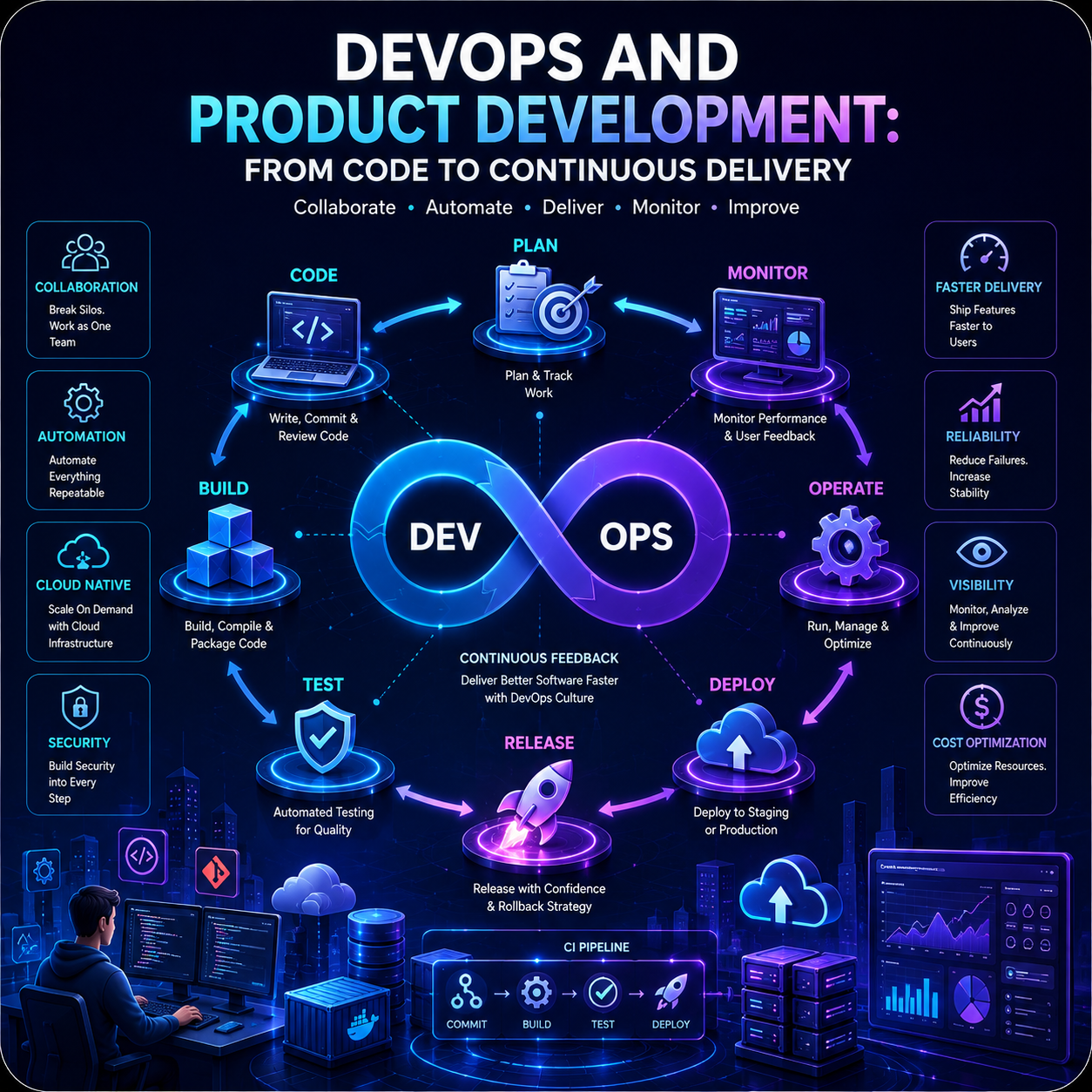
DevOps and Product Development: From Code to Continuous Delivery Building a successful digital product requires much more than writing code. Modern businesses need to deliver features quickly, maintain reliable systems, respond to customer feedback, fix issues rapidly, and continuously improve their products. This is where DevOps plays an important role. DevOps brings software development and IT operations closer together through collaboration, automation, continuous integration, continuous delivery, infrastructure automation, monitoring, and feedback. Instead of treating development and operations as separate stages, DevOps creates a continuous product development lifecycle. The result is a development process where teams can move more efficiently from an idea to working software and from working software to continuous improvement. What Is DevOps? DevOps is a combination of development practices, operational processes, automation, tools, and organizational culture designed to improve the way software is built and delivered. The word combines: Development + Operations = DevOps Traditional software development can create a gap between developers who build applications and operations teams responsible for running them. DevOps aims to reduce this gap. Developers, operations engineers, security teams, QA professionals, and product teams can work together throughout the product lifecycle. The goal is not simply to deploy software faster. It is to create a system where teams can build, test, release, operate, monitor, and improve products continuously. Why DevOps Matters for Product Development Digital products are constantly evolving. Customers expect new features, better performance, improved security, and faster responses to problems. A traditional release process might require teams to wait weeks or months before deploying changes. DevOps introduces automation and continuous delivery practices that can make releases smaller, faster, and more predictable. This can help businesses achieve: * Faster product releases * More reliable deployments * Faster bug fixes * Improved collaboration * Better product quality * Reduced manual work * Faster feedback * Improved scalability The DevOps Lifecycle DevOps is often represented as a continuous lifecycle rather than a linear process. A typical DevOps workflow includes: Plan → Code → Build → Test → Release → Deploy → Operate → Monitor → Feedback The cycle then repeats. Each stage contributes to continuous product improvement. 1. Plan Everything begins with planning. Product managers, designers, developers, and other stakeholders identify: * Customer problems * Product requirements * Features * Technical requirements * Business goals * Release priorities Modern teams often use agile methodologies to break large requirements into smaller deliverable pieces. The goal is to create a clear connection between business objectives and technical work. 2. Code Developers convert product requirements into software. Modern development teams commonly use: * Git * GitHub * GitLab * Bitbucket * Code review * Branching strategies * Automated development tools Version control allows teams to track changes, collaborate, review code, and safely manage different versions of an application. Good development practices at this stage create a strong foundation for the rest of the DevOps lifecycle. 3. Build Once code is committed, it needs to be converted into a deployable application. Build processes can automatically: * Install dependencies * Compile code * Bundle applications * Build container images * Generate artifacts * Validate configuration Automation reduces manual errors and makes the build process repeatable. 4. Test Testing is one of the most important parts of DevOps. Instead of waiting until the end of development to test an application, automated testing can happen throughout the development process. Testing can include: Unit Testing Tests individual functions or components. Integration Testing Checks whether different components work correctly together. End-to-End Testing Tests the application from the user’s perspective. Security Testing Identifies potential security vulnerabilities. Performance Testing Measures how an application behaves under different workloads. Automated testing allows teams to detect problems earlier. 5. Release After successful testing, software can be prepared for release. Release automation can help teams: * Manage versions * Approve releases * Configure environments * Package applications * Prepare deployment workflows Smaller releases can reduce the risk associated with deploying large amounts of change at once. 6. Deploy Deployment moves the application into an environment where users can access it. Modern DevOps practices can automate deployment to: * Development environments * Testing environments * Staging environments * Production environments Cloud infrastructure, containers, and deployment automation can make this process more consistent. 7. Operate Once an application is deployed, it needs to be operated and maintained. Operations teams monitor: * Availability * Performance * Infrastructure * Network activity * Application health * Resource usage The goal is to keep the product reliable and available for users. 8. Monitor Monitoring provides visibility into what is happening inside the application and infrastructure. Teams can track: * Response times * Error rates * CPU usage * Memory usage * Traffic * Database performance * Service availability Monitoring helps teams identify problems before they significantly affect customers. 9. Feedback DevOps creates a continuous feedback loop. Feedback can come from: * Customers * Application analytics * Monitoring systems * Support teams * Developers * Product managers * Security teams This information goes back into the planning stage. The result is a continuous cycle of: Build → Measure → Learn → Improve Continuous Integration Continuous Integration (CI) is the practice of frequently integrating code changes into a shared codebase while automatically validating those changes. When a developer pushes code, a CI pipeline can automatically: 1. Retrieve the code 2. Install dependencies 3. Build the application 4. Run tests 5. Perform code-quality checks 6. Perform security checks 7. Generate a build artifact If a problem is detected, the team can address it immediately. This reduces the risk of discovering major integration problems late in the development process. Continuous Delivery Continuous Delivery (CD) extends automation beyond integration. After code passes automated validation, it is kept in a state where it can be released reliably. A typical workflow might look like: Developer → Git Repository → CI Pipeline → Automated Tests → Build → Staging → Production Depending on the organization’s release strategy, production deployment may require manual approval or may be automated. Continuous Deployment Continuous deployment goes one step further. With continuous deployment, changes that pass the required automated checks can be automatically deployed to production. This allows organizations to release software frequently. However, continuous deployment requires strong: * Automated testing * Monitoring * Security controls * Rollback capabilities * Deployment processes Not every product needs fully automated production deployment. DevOps Tools DevOps is not one specific tool. Different tools can support different stages of the lifecycle. Version Control * Git * GitHub * GitLab * Bitbucket CI/CD * GitHub Actions * GitLab CI/CD * Jenkins * CircleCI Containers * Docker * Kubernetes Infrastructure * Terraform * Cloud provider services * Infrastructure as Code tools Monitoring * Prometheus * Grafana * Cloud monitoring platforms The right tools depend on the product, infrastructure, team size, security requirements, and organizational needs. DevOps and Cloud Computing DevOps and cloud computing work particularly well together. Cloud platforms provide programmable infrastructure that can be provisioned and managed through automation. DevOps practices can then automate: * Infrastructure creation * Application deployment * Scaling * Monitoring * Configuration * Security checks This creates an environment where development teams can move from code to running software much faster. DevSecOps: Bringing Security Into DevOps Security should not be treated as something that happens only after development is complete. DevSecOps integrates security practices throughout the development lifecycle. Security can be incorporated into: * Code reviews * Dependency scanning * Container scanning * Infrastructure configuration * API testing * Authentication * Access control * Deployment pipelines This approach helps identify security problems earlier, when they are generally easier to address. Infrastructure as Code Infrastructure as Code, or IaC, allows infrastructure to be managed using configuration files and code. Instead of manually creating servers or configuring environments, teams can define infrastructure requirements programmatically. Benefits include: * Repeatability * Consistency * Version control * Automation * Faster environment creation * Reduced configuration errors IaC can become especially valuable as applications scale across multiple environments. DevOps and Product Teams DevOps is not only an engineering responsibility. It can influence the entire product organization. Product Managers Can receive faster feedback from real product releases and analytics. Developers Can receive faster feedback from automated tests and deployment pipelines. QA Teams Can automate testing and integrate quality checks throughout development. Operations Teams Can automate infrastructure and improve system reliability. Security Teams Can integrate security checks into development and deployment workflows. Business Teams Can benefit from faster delivery of product improvements. DevOps therefore works best as a cross-functional approach rather than a separate department. Benefits of DevOps for Digital Products Faster Time to Market Automation reduces manual steps and allows teams to release features more efficiently. Better Reliability Automated testing and deployment processes can reduce human errors. Faster Recovery Monitoring and automated rollback mechanisms can help teams respond to failures more quickly. Improved Collaboration Shared processes and tools reduce communication gaps between teams. Continuous Improvement Frequent releases create more opportunities to collect customer feedback and improve the product. Challenges of Implementing DevOps DevOps can provide significant benefits, but implementation isn’t always easy. Cultural Resistance Teams may be accustomed to working independently. DevOps requires collaboration and shared responsibility. Tool Complexity Organizations can become overwhelmed by the number of available DevOps tools. Choosing a simple, effective toolchain is often better than adopting every available technology. Automation Requires Investment Building reliable CI/CD pipelines, automated tests, infrastructure automation, and monitoring requires time and engineering effort. Legacy Systems Older applications may not easily support modern automation and deployment practices. Businesses may need to modernize gradually. How to Implement DevOps Successfully Organizations can start small instead of attempting to transform everything at once. Step 1: Establish Version Control Move application code and configuration into a reliable version-control system. Step 2: Automate Builds Create a repeatable process for building the application. Step 3: Introduce Automated Testing Start with essential tests and gradually expand coverage. Step 4: Create a CI Pipeline Automatically validate code changes whenever they are submitted. Step 5: Automate Deployments Create repeatable deployment processes for development and staging environments. Step 6: Add Monitoring Track application performance, errors, and infrastructure health. Step 7: Integrate Security Add security checks throughout the pipeline. Step 8: Continuously Improve Use metrics and team feedback to improve the development and delivery process. The Future of DevOps DevOps is continuing to evolve alongside cloud computing and artificial intelligence. Emerging trends include: * AI-assisted development * AI-powered operations * Platform engineering * GitOps * Automated security * Cloud-native DevOps * Infrastructure automation * Observability platforms * Self-service developer platforms Artificial intelligence can increasingly assist developers with coding, testing, troubleshooting, documentation, and infrastructure management. The future of DevOps will likely involve more automation while keeping humans responsible for product decisions, architecture, security, and business outcomes. Conclusion DevOps has transformed software development from a process focused primarily on writing and releasing code into a continuous product improvement lifecycle. By combining collaboration, automation, CI/CD, testing, cloud infrastructure, monitoring, and security, businesses can deliver digital products faster while improving reliability and quality. The real value of DevOps isn’t simply deploying software quickly. It is creating an environment where teams can: Plan → Build → Test → Release → Monitor → Learn → Improve again and again. For modern digital product teams, this continuous cycle can turn software development into a faster, more reliable, and more customer-focused process. The future of product development isn’t just about building software. It’s about continuously delivering value.